Home/Platform
Features
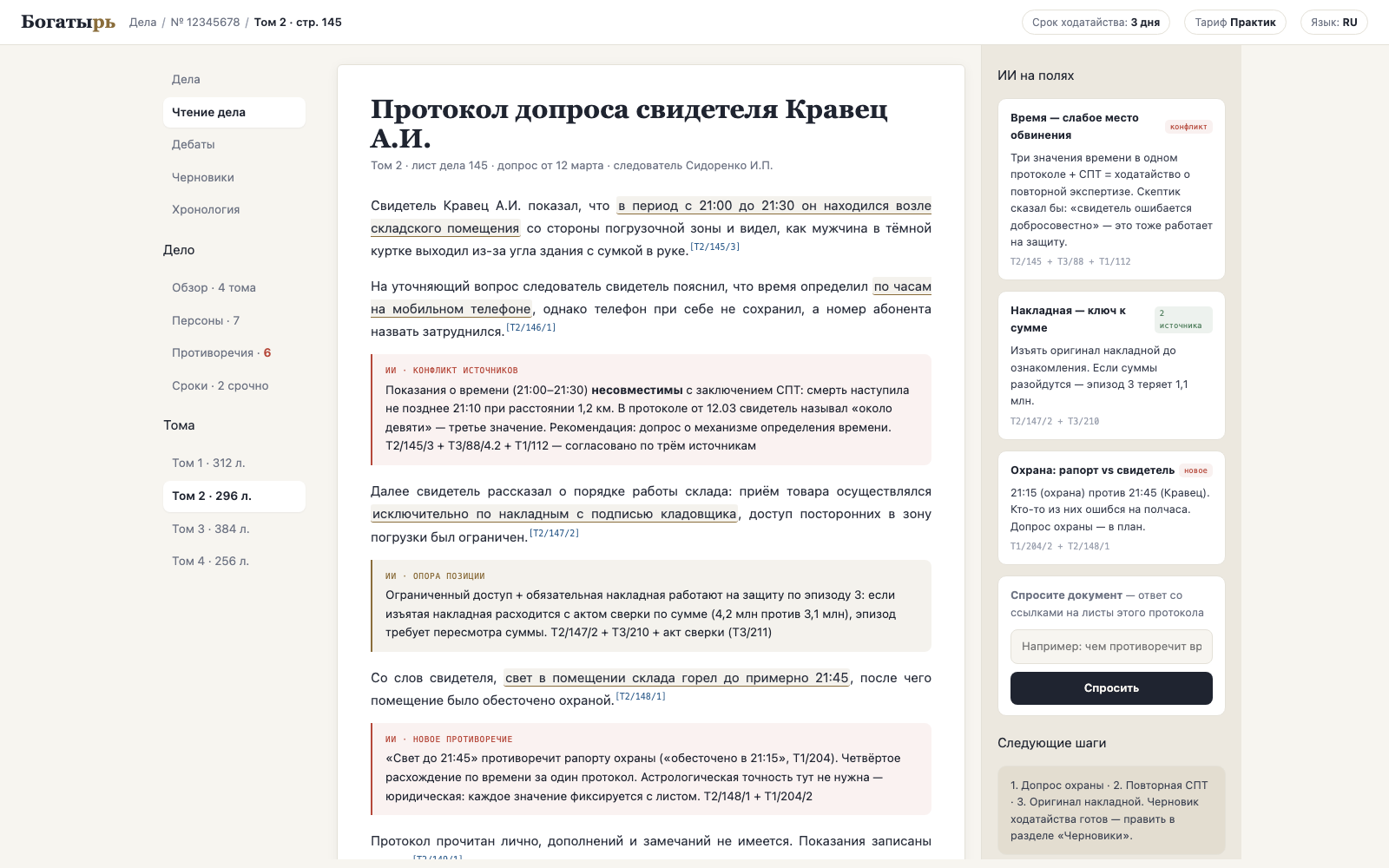
The platform brings multi-volume files together into one working environment: search, a relationship graph, contradictions, deadlines, document drafts and adversarial review of the analysis. It works in the browser, in the apps and in Telegram.
Core
A question about the case brings an answer with references to volume, page and paragraph. Each reference opens a real fragment, not a paraphrase.
Who is connected to whom, where each is mentioned, how they relate to one another. Name-entity resolution is part of the engine, not manual work.
It stitches together testimonies, expert reports and documents across all volumes and highlights discrepancies with a priority: what to tackle first.
A chronology of events grounded in the sheets: you can see where the prosecution's version diverges from the files.
The date is computed by deterministic code from confirmed data, not by the model. Reminders arrive in Telegram and in the app.
Motions, requests and appeals based on jurisdiction templates. A document is created as a draft and approved by a human.
Checking third-party documents and your own drafts: where a claim is not supported by the file, and where it relies on a copy instead of the original.
Disputed pages go into a manual review queue. You can see which sheets were recognised with confidence and which need a lawyer's eye.
Files, a folder, scans from a phone, Google Drive. Bulk import of volumes runs on the firm's server, not through the relay.
Verification
An ordinary assistant evaluates its own work. Cassation starts an argument: the analyst formulates, the sceptic attacks the logic, opposing counsel builds the position of the opposing party, and the judge issues a verdict on each claim — with references and with no right to rewrite the record.
Builds the answer from the case files.
Looks for where a conclusion does not follow from the fragments.
Plays the role of a second lawyer against you.
Records: stood, adjusted, rejected, disputed.
| Argument profile | When to use it | What you get |
|---|---|---|
| Analysis review | Before relying on a conclusion | A verdict on each claim and a risk map |
| Dispute over interpretation | A provision of law or a contract clause reads two ways | Which interpretation is more robust and where case law is needed |
| Hearing rehearsal | Preparation for cross-examination and pleadings | A list of questions from the opposing party and the judge |
| Red-teaming a document | Before sending it to a counterparty or to court | Loopholes, ambiguous wording, gaps |
| Cross-checking models | A question where the cost of error is high | A signal of legal uncertainty: the models disagree |
The verdict is a structure, not text
The outcome of the debates is compiled into a case risk map, tasks for revising the draft and a pre-filing checklist. The transcript is exported as a separate file for the firm's partner.
Clients
Deadlines, documents, case chat, debates, drafts, photographing a page with the camera, asking a question by voice. Offline cache: the most recent files and answers are available without a network — courtroom connectivity is poor.
in the stores, subject to platform rules: purchase only on the website
Full functionality: cases and files, debates, the graph, contradictions, the timeline, deadlines, drafts, fact-checking, administration of users and limits. The same address serves both our server and the firm's server.
Case questions with citations, sending documents and photos into the case, deadline reminders, a morning digest. In the team's group chat the bot acts as a participant: it answers, accepts files and keeps the schedule.
the "observer" mode is turned on by the case owner and off in a single step
The client submits documents, sees the case status and approves drafts — in a separate workspace and a personal chat. Tactical and personal materials are not released to the shared chat on request.
External sources
A reference to a provision is a reference to the actual text with the revision date and a status of "in force / amended / repealed". A finding about a person of interest arrives as a card with the source, the date and a snapshot of the page.
A boundary the product does not cross
We do not connect services that dig up personal data. The reason is practical: such evidence falls apart at the first objection, because its provenance cannot be disclosed — and the firm that received it is answerable for it too.
Every query to an external source is written to the audit log: who, when, on which case and what they searched for. For the firm this is both cost control and evidence of good faith.
Team
| Role | Permissions |
|---|---|
| Administrator | Users, the server, backups, limits, chat linking |
| Partner | All the organisation's cases, document approval, cost control |
| Lawyer | Own cases: analysis, debates, drafts, approval |
| Assistant | Uploading files and viewing; cannot approve documents |
| Client | Only their own case: submit documents, see the status, approve a draft |
Every significant action goes into the audit log: who, what, when.